Focus that lives in your menu bar.
A quiet, beautiful Pomodoro timer for Mac. Work in focused blocks, take real breaks, and keep a note of every session so you always know where the hours went.
- Free
- macOS 15 Sequoia or later
- Apple silicon & Intel
- No account needed
01Features
Everything you need to stay in it.
Pomodoro keeps the timer in sight and the rest out of your way. No Dock icon, no window to manage, nothing competing for your attention.
A note for every session
Write what you are working on before, during or after a session. Add #tags and “where did the week go?” finally has an answer.
Goals, kindly kept
A daily goal ring and gentle streaks. No badges, no guilt.
Streaks forgive a short day. They only end when a whole day is missed.
Insights that tell the truth
This week against last, fourteen days against your goal, your top tags and a twelve-week heat grid.
A tick that keeps time, not noise
Seven sound themes, each a seamless tick with a matching chime. Press play and hear a few seconds of focus.
Keyboard first
Global shortcuts you choose. Start, pause and skip without leaving your work.
A week worth showing
Turn today, this week or all time into a beautiful card. Wide or square PNG.
Never loses time
The timer runs from an absolute deadline, so it survives sleep, wake and relaunch to the second.
- Launch at login
- Auto-start breaks
- Presets 25/5 · 50/10 · 90/15
- Drag or scroll the ring
- ⌥-scroll to add time
- Actionable notifications
- CSV & JSON export
- Search & filter history
- 12-week heat grid
- Milestone moments
- Respects Reduce Motion
- Light & dark
02How it works
Three steps. Then the work.
Your first session is one keypress away. There is nothing to sign up for and nothing to configure.
Start from anywhere
Click the ring in your menu bar or press your shortcut. Pick 25, 50 or 90 minutes, or drag the ring to any length.
Stay in the work
The countdown sits quietly in the menu bar. A soft tick keeps time, and breaks start on their own when you want them to.
Write it down
When the chime sounds, the note field is already waiting. A line about what you did becomes a record you can search.
03Themes
Eight colour worlds. Pick your light.
Every theme reworks each phase’s accent and the drifting aurora behind it. Switching feels like changing the light in a room, not moving to a different app.
04Inside the app
A full window, when you want one.
The menu bar is for the moment. The app window is for the long view: your focus, your insights and your history, behind frosted glass.
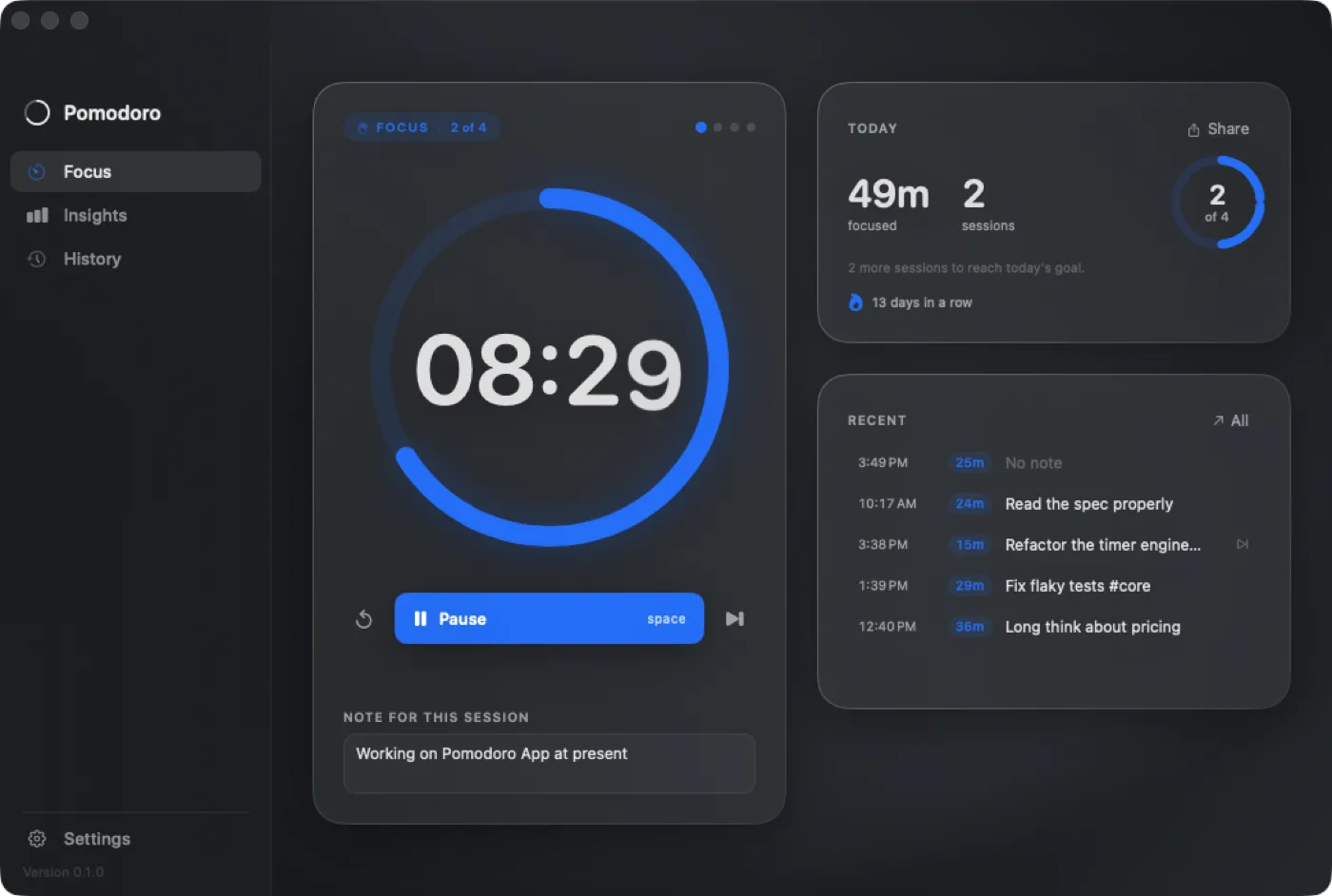
The timer, today’s progress and your recent sessions in one calm window.
05Privacy
Your hours are yours alone.
A record of how you spend your days is personal. Pomodoro keeps it where it belongs: on your Mac, and nowhere else. Export it whenever you like, as CSV or JSON.
Read the privacy policyStored on your Mac
Sessions, notes and settings live in a local database. Nothing is synced anywhere.
No analytics
No tracking, no telemetry, no crash reporters phoning home. We can’t see how you use it.
No account
No sign-up, no email, no password. Download it, open it, start focusing.
No network at all
The app makes no network requests. Your work history never leaves your computer.
06Pricing
Simple. Honest.
One app with everything in it. No subscriptions, no tiers, no features held back.
Pomodoro Timer
Everything included, for every Mac you own.
- Menu bar timer and full app window
- Notes, #tags and searchable history
- Insights, goals and gentle streaks
- Eight colour themes, seven sound themes
- Shareable progress cards
- Global keyboard shortcuts
- CSV and JSON export
- Every future update
macOS 15 Sequoia or later · Apple silicon & Intel
07FAQ
Questions, answered.
Something else on your mind? Get in touch. A real person reads every email.
Your next good hour starts here.
Download Pomodoro Timer and start your first session in seconds. Free, private, and made for the Mac.